jueves, 20 de octubre de 2016

Test it first!


Title’s pretty self explanatory. Or, is it? software testing…
This can be a very fun process. You’re basically trying to break things from all possible angles. Find bugs and you’ve done your work correctly. Of course, the software development team’s work just doubled! Or maybe backstepped all the way.


Your responsibilities as a software tester are verifying and validating that a program, application or product pass all following tests:
  • meeting business and technical requirements upon which design and development were constructed (You see where everything I’ve talked about design and requirements in other blog posts gets us to?)
  • working as expected
  • possible implementation on multiple environments and use cases
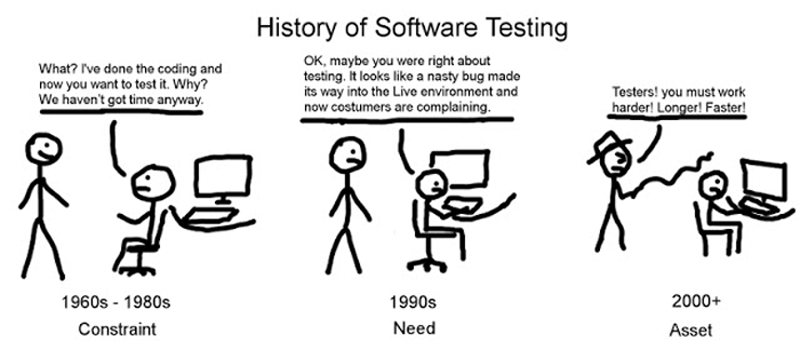
No easy work, that’s for sure. If some bug gets to the users, not only will the software development team be approached, but software testers as well. Why wasn’t the bug discovered during testing?


Before I go any further, aren’t you wondering why computer bugs are called BUGS? I sure was...
What does the world have against bugs? Poor animals. Well, back in the day computers were as large as classrooms, actual real-life, living bugs were a huge problem in these monstruous computers. You got rid of the bug, you got rid of a problem on your program. Funny how these terms stick through history, right?


Perhaps I’ll be saying this in every blog from now on, but in a previous blog post, I talked about the Software Lifecycle. Remember? Please do :(
Software testing is an essential part of the SDLC. It is at this point (no matter the methodology) that you might find bugs that will throw you back some steps of the development process. Fix those bugs, test again, and pray it all goes well.


You might want to think about some types of software testing:
  • Static testing can find bugs without executing code! It’s done during verification process. Documents and source code are reviewed. All this in terms of walkthrough, inspection, etc.
  • Dynamic testing includes actual execution of the code. It’s done during validation process. All this in terms of unit testing, integration, system testing, etc.


You surely do tests all day long, for everything. In fact, everything you know now is surely only the conclusions upon which you have arrived after doing some tests of validity (hopefully). I mean, don’t you try several clothes on before leaving your house? try several keys for your door before finding the right one? try that new food on the menu? In BIG terms, everything you’re doing in your life right now is a big testing you do on yourself to see if what you’re doing makes you a happy person. You’re a professional tester already.

You might not be that far from being a software tester…

These were the coolest sources I found for the information I present here: http://istqbexamcertification.com/what-is-a-software-testing/
http://www.codeproject.com/Tips/351122/What-is-software-testing-What-are-the-different-ty

Go have fun testing your path through life in search for happiness :)

Patterns. Software patterns everywhere…

Ummm what?
I didn’t know what these were, either. After some research, I’ll now try explaining to you what I learned. Sounds good to you?

Again, this has a very continuous relationship with previous topics I’ve talked about before. Specially, you’ll find yourself thinking of software architecture (hopefully). Why? For starters, design patterns are something a software architect should always be able to identify. Let me too you why…

There are some reusable, optimized solutions to common programming problems. Solutions that people who build programming languages should also identify right away. This solutions I’m talking about are, in fact, design patterns. But all these people must be careful: “If implemented in the wrong place, it can be disastrous and create many problems for you. However, implemented in the right place, at the right time, it can be your savior”. (source)

It’s important to know there are basically 3 types of design patterns:
  • Structural
  • Creational
  • Behavioral
Their names don’t say much, do they?

Structural patterns refer to relationships, how entities work together.
Creational patterns refer to the way mechanisms are instantiated, so each situation has its easiest way of object-creation.
Behavioral patterns refer to the communication between entities (please do not confuse these with structural patterns).

What I mean by “patterns” is basically past situations other programmers have been through. They’ve experienced the same, and now they know a solution for it. Why wouldn’t you want to consider their way of solving these problems?

Let me include a very illustrative result:


Imagine something like this in code-form. How many interfaces do you see? several.
But on the other side, in how many ways is this thing reacting to the several interfaces? One. Just one! This is precisely one example of the adapter pattern: “structural design pattern that allows you to repurpose a class with a different interface, allowing it to be used by a system which uses different calling methods”. How COOL is that?

This one and some other examples can be found here: https://code.tutsplus.com/articles/a-beginners-guide-to-design-patterns--net-12752

One last thing before you go: ALWAYS make sure the solution you’re working with is actually meant for particular problems like your own. Hopefully you won’t ever find yourself in a situation where you learn this the hard way.


Ted Mosby, Architect.

This is related to the previous posts of mine about software design, so hopefully you know about this. What does this all have to do? A lot, really. One very cool sentence I saw on the Internet on it: “design completes the how that architecture doesn't (and shouldn't) talk about”.

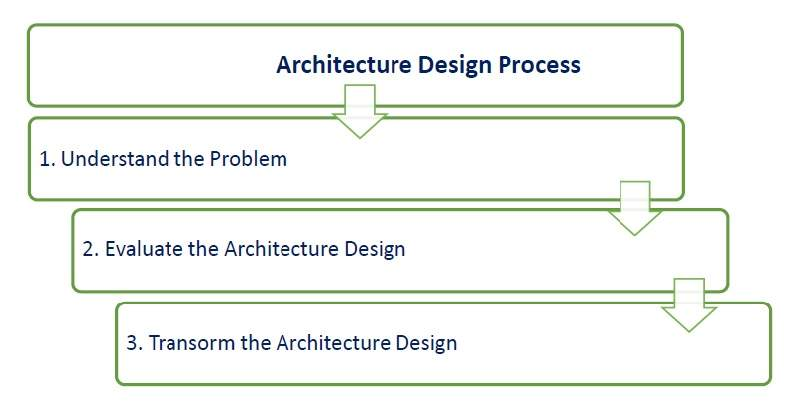
Architecture is the bigger picture. It specifies frameworks, languages, scope, goals and methodologies. On the other hand, design is more specific; design plans how the code will be organized and how different parts of the system will look.

Software architecture is responsible for providing:
  • rules for how components and modules will be combined and how they’ll communicate.
  • reusability and partitioning solutions to frequent problems.


The common thing for these two things is that they should, SHOULD always be made after goals and requirements have been defined. It makes no sense to do it before. Any attempt to doing it before will most likely lead to necessary changes that will surely affect the efficiency of all your team.

Do you want to become a software architect? Here’s the intro to a short course for doing so!


If you wish to continue reading about this, you can! The sources I used might lead you somewhere:

Yeah… Software (de)sign

Ok, hear me out. I’m now going to talk about software design and software architecture. Are you interested? Good.

First: design. This means the process where you transform gathered user requirements. This is made through a Specification document. I’ve talked about this in past blog posts, remember? Please remember :( so why am I talking about it again? Because I still have things to say…

Software design leads to 3 different levels of results:
  • Architectural: highest abstract version of a system. This just helps designers get the idea.
  • High-Level: Less abstract view of subsystems and modules. It takes into account all components.
  • Detailed: Here details of how the implementation should be made. Defines a structure and interfaces for modules to communicate with each other.
It’s here that you might want to think about modularization, dividing a software system into multiple, independent modules. This makes it easier to maintain and reuse. And more importantly, it leads (ideally) to parallel executing! With several modules, there’s not just one sequential sequence of steps running, as each module is independent and able to do it on its own. Isn’t this awesome?


How do I know all this? I read it. I researched. You want to know more? Go ahead! These were my sources:

viernes, 14 de octubre de 2016

UML, visual help...?

UML. Unified Modeling Language. Shortly, it’s a visual modeling language. It’s very common for business analysts, software architects and developers to use it. It helps provide guidance for team’s activities (specific developers) and can also help monitor and measure team progress!

Used software engineering in general, but more specifically in object-oriented software, it shows an application structure.
This will basically help you visualize your classes, and easily communicate to others the structure and content of a class, or indications of what these should be.

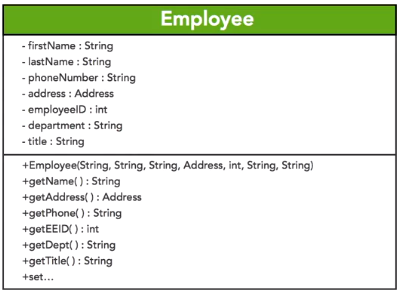
As an example, this is what an UML class diagram for some “Employee” class would look like:
Nice, huh?
  • The top rectangle contains the name of the class desired.
  • On the next rectangle we can see its instance data, its state.
  • But we also need specifications for Employee’s behavior (methods needed to access its information), and so it’s specified on the next rectangle. Here you can see a constructor method, as well as some getters. Setters are not specified, but they would also be listed in this rectangle.
  • Did you see the signs at the start of each line of these last 2 rectangles?
    • MINUS means private!
    • PLUS means public

There are 14 types of UML diagrams, though. Here’s a list of some of them:
  • class diagram
  • use case diagram
  • object diagram
  • sequence diagram
  • state machine diagram
  • activity diagram
  • package diagram

All 14 types can be classified into 2 main categories: structure diagrams and behavioral diagrams. Structure diagrams shows the different objects in a system, whereas behavioral diagrams describe how objects interact with one another…

Authors: Carlos Martell, Hermes Espinola, Jesús Alvarez, Juan Melendres & Alejandro Güereca

To take your reading one or many steps further, you can start reading through these sites, our sources for this post:

martes, 20 de septiembre de 2016

*insert clickbait title here*

Okay, so you’ve come to my blog post. You want to know about software requirements elicitation and specification? Then stay with me.


I’ve talked about software requirements before, so what’s this deal with elicitation and specification, then?


First, let me explain the elicitation process. We start by gathering the requirements through discussions with the client and end users (through interviews, surveys, etc), then we make some sort of prioritization on these (through task analysis, etc). Now that we have all this, a discussion/negotiation with the stakeholders is made (here you might want to come up with some prototype to have more valuable feedback). At any point you might realize you have to go back to a previous phase to do modifications, or repeat them entirely. Everything must be documented.


Now, software requirement specification is supposed to be this document you create ONCE the requirements have been collected. This document will have specifications on how the intended software will interact with hardware, external interfaces, response time, limitations, etc. You can imagine things get pretty technical at this point, so it’s preferred that this document is written by some sort of system analyst. You’re going to want this document to be useful for the software development team, so…


This document’s appendix would hopefully look something like:
  • user requirements in natural language
  • technical requirements in structured language
  • design description in pseudo code
  • GUI screen prints
  • conditional and mathematical notations

You definitely don’t want this to happen:


All this is meant to be valuable information upon which you’ll know what has to be accomplished. Even if done simultaneously with other phases of the project (agile) or all focus is put on this phase until it’s complete (waterfall), this phase is one you definitely don’t want to miss. Knowing what your users want and what they think of your product is vital.


If you want to take your readings any further, these were my sources:

jueves, 15 de septiembre de 2016

Would you drop your mouse for your eyes?

How long did it take you to click on this blog? You had to scroll your way with your mouse until you reached the clickable text, right? Or you clicked at it with your finger directly on the screen… On the other hand, how long did it take you to look at this blog’s title? Milliseconds. Yeah. That’s what I mean.


It’s now been over a decade that we’ve been using the computer mouse as a fundamental tool in our interaction with computers. It’s not the only way we point at things, though. Mobile phones, mainly thanks to the explosion the iPhone brought, have also taught us we can directly touch with our fingers on the screen. Augmented reality has also taught us to use the movement of our body, with cameras and motion detectors.


But, think about it. All these interactions I’ve mentioned need another type of interaction none of them are truly taking into account. Before you ever move your mouse, touch your screen or move your hand in the air, the first thing you do is point your eyes at that thing. What if we took approach of this very first thing everybody does? Eye-tracking technology. That’s what many predict the future holds for us all. A multimodal computer interaction.


What most of us have now in our pockets would have been considered a supercomputer 15 years ago. And the revolution’s not stopping anytime soon. “The general notion of pointing at things to navigate through a menu can be done in tens of milliseconds with you eyes versus the time it takes you to use your hands”, says Jim Magraff, CEO of Eyefluence, a company that now builds eye-tracking technology for AR and VR.
Resultado de imagen para eye tracking technology
Communication with computers should be seamless, no delays nor interruptions. An “iPhone moment” could happen anytime soon with eye-tracking technology, with the potential propagation of multimodal human computer interaction. What do you think? Imagine how big a leap this would be for disabled people.


I can personally think of some very cool analytics you could do… Imagine if you could know which parts of your webpage people look at immediately, which hold their attention the longest, if they read through your blogs from beginning to end (though for you to be reading this far, you hopefully did! 😄). But, I can also think of some very obscure ways this could be used… Or even some annoying ones like an ad pausing yourself if you look away from it. You couldn’t help it but LOOK through the entire thing...


Have a look at this. I dare you not to use your mouse:


If you want to take your reading any further, this is the source I used: